FAQFAQ   SearchSearch   MemberlistMemberlist   UsergroupsUsergroups   RegisterRegister   ProfileProfile   Log in to check your private messagesLog in to check your private messages   Log inLog in 
Adding Shine To Text

 
Post new topic   Reply to topic    Bloodfist [SoD]'s Board Forum Index -> Tutoriale
View previous topic :: View next topic  
Author Message
Bloodfist
Forum Guardian
Forum Guardian
Bloodfist

Joined: 26 Oct 2007
Posts: 758
Location: Underworld

PostPosted: 22/12/2007 05:41    Post subject: Adding Shine To Text Reply with quote

1. Open up the image that you will be using, this is mine:

Adding Shine To Text Adding Shine To Text

2. Now that your image is open and making sure that its the .psd so you can edit the text on it. In your layers menu, hold down CTRL and click on the text layer so that only the text is selected.
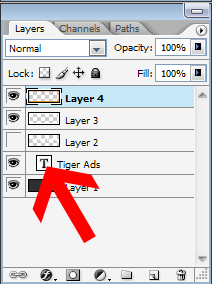
Adding Shine To Text Adding Shine To Text

Once done right, your text should have all those dotted lines around it. If so, you got it right like so:

Adding Shine To Text Adding Shine To Text

Once it is all selected, make sure to make a new layer.

3. Now that we have this done and making sure that we are working on our new layer, get out your paintbucket tool making sure that it is set to white or #FFFFFF. Simply fill in the text in white. Like so:

Adding Shine To Text Adding Shine To Text

Your whole text should now be coloured in white.

4. Now, we are going to add in the shine and vut away some of the white. Get out your Rectangular Marquee Tool located here:
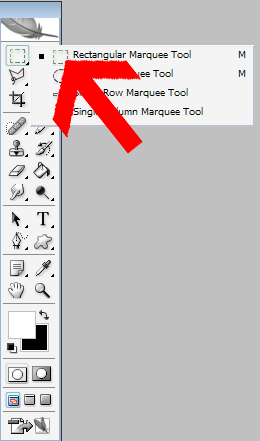
Adding Shine To Text Adding Shine To Text

Once selested, drag it over part of the white text layer, about halfway or so. Once thats done, hit Delete. You should now have about half of the white text now like so:

Adding Shine To Text Adding Shine To Text

5. This is the last tep to give it that "shine". Right click on the layer with the half white text on it and select "Blending Options". All you do is adjust the opacity so that it is faded and gives a nice look to it.

Now, your done!

Adding Shine To Text Adding Shine To Text
_________________
<center>Adding Shine To Text Adding Shine To Text
Adding Shine To Text Adding Shine To Text
Adding Shine To Text Adding Shine To Text</center>
Back to top
View user's profile Send private message
Display posts from previous:   
Post new topic   Reply to topic    Bloodfist [SoD]'s Board Forum Index -> Tutoriale All times are GMT + 2 Hours
Page 1 of 1

 
Jump to:  
You cannot post new topics in this forum
You cannot reply to topics in this forum
You cannot edit your posts in this forum
You cannot delete your posts in this forum
You cannot vote in polls in this forum


Powered by phpBB © 2001, 2002 phpBB Group
Fa-ti si tu propriul forum GRATUIT, pe www.myforum.ro