FAQFAQ   SearchSearch   MemberlistMemberlist   UsergroupsUsergroups   RegisterRegister   ProfileProfile   Log in to check your private messagesLog in to check your private messages   Log inLog in 
Photoshop Cs2 Animation Tutorial

 
Post new topic   Reply to topic    Bloodfist [SoD]'s Board Forum Index -> Tutoriale
View previous topic :: View next topic  
Author Message
Bloodfist
Forum Guardian
Forum Guardian
Bloodfist

Joined: 26 Oct 2007
Posts: 758
Location: Underworld

PostPosted: 21/12/2007 03:45    Post subject: Photoshop Cs2 Animation Tutorial Reply with quote

Tutorial By: Evil Guy

This tutorial will show you how to make a animated pictures in adobe photoshop cs2

Step. 1 Open a new document with any size, i used 300 x 100
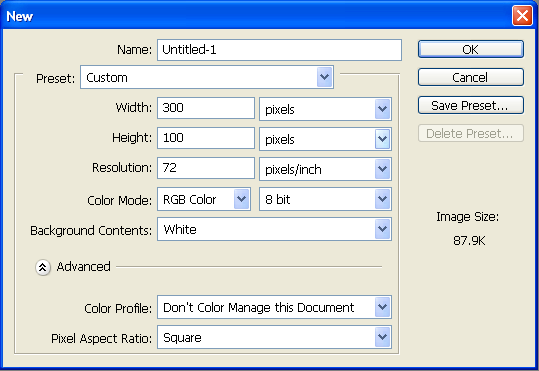
Photoshop Cs2 Animation Tutorial Photoshop Cs2 Animation Tutorial

Step. 2 Now type anything in it, I typed Evil Guy
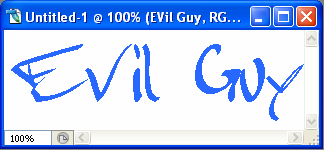
Photoshop Cs2 Animation Tutorial Photoshop Cs2 Animation Tutorial

Step. 3 Now open the animation window, go window --> Animation

It will lOok like this:

Photoshop Cs2 Animation Tutorial Photoshop Cs2 Animation Tutorial

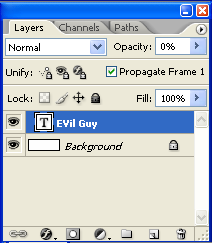
Step. 4 Now on the left in the layers box:
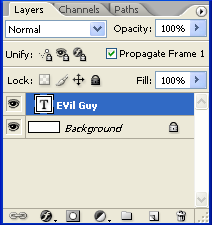
Photoshop Cs2 Animation Tutorial Photoshop Cs2 Animation Tutorial

And change the opacity of the test to 0% like the following
Photoshop Cs2 Animation Tutorial Photoshop Cs2 Animation Tutorial

Step. 5 Now press alt+shift+ctrl+F to open a new frame

Step. 6 Now in the new frame change the following settings in the layer box:

Photoshop Cs2 Animation Tutorial Photoshop Cs2 Animation Tutorial

Step. 7 Now click the arrow on the top left of the animation window and click tween and change it to the following settings:
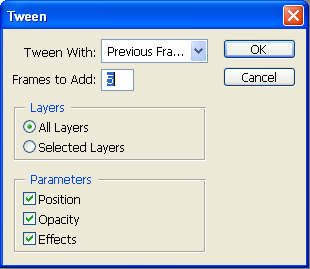
Photoshop Cs2 Animation Tutorial Photoshop Cs2 Animation Tutorial

Click Ok

Step. 8 Click the Play button in the animation window, the animation will look like this:

Photoshop Cs2 Animation Tutorial Photoshop Cs2 Animation Tutorial
_________________
<center>Photoshop Cs2 Animation Tutorial Photoshop Cs2 Animation Tutorial
Photoshop Cs2 Animation Tutorial Photoshop Cs2 Animation Tutorial
Photoshop Cs2 Animation Tutorial Photoshop Cs2 Animation Tutorial</center>
Back to top
View user's profile Send private message
Display posts from previous:   
Post new topic   Reply to topic    Bloodfist [SoD]'s Board Forum Index -> Tutoriale All times are GMT + 2 Hours
Page 1 of 1

 
Jump to:  
You cannot post new topics in this forum
You cannot reply to topics in this forum
You cannot edit your posts in this forum
You cannot delete your posts in this forum
You cannot vote in polls in this forum


Powered by phpBB © 2001, 2002 phpBB Group
Fa-ti si tu propriul forum GRATUIT, pe www.myforum.ro