FAQFAQ   SearchSearch   MemberlistMemberlist   UsergroupsUsergroups   RegisterRegister   ProfileProfile   Log in to check your private messagesLog in to check your private messages   Log inLog in 
Tutorial: Pheonix Hair Style

 
Post new topic   Reply to topic    Bloodfist [SoD]'s Board Forum Index -> Tutoriale
View previous topic :: View next topic  
Author Message
Bloodfist
Forum Guardian
Forum Guardian
Bloodfist

Joined: 26 Oct 2007
Posts: 758
Location: Underworld

PostPosted: 22/12/2007 21:17    Post subject: Tutorial: Pheonix Hair Style Reply with quote

With some simple brushing techniques, and a bit of color tweaking, you can spice up your photos with this flaming hair tutorial.

This effect relies on a good photo. You're going to a shot of some long hair, preferably flowing in the wind or tossed in the air. Blonde hair is going to work best, so if your model has darker locks, try changing it to blonde in Photoshop.
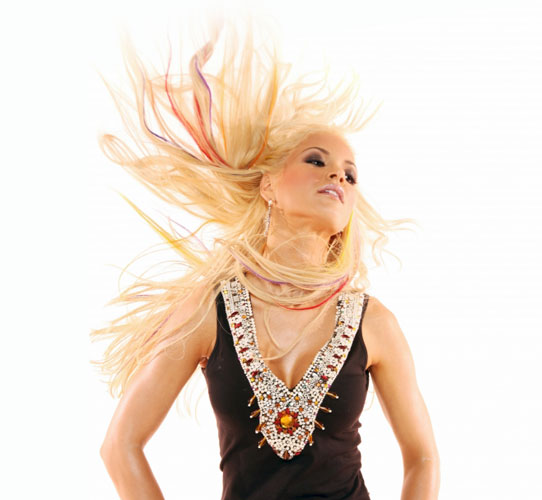
Tutorial: Pheonix Hair Style Tutorial: Pheonix Hair Style

The majority of the work in this involves brushing the hair with the Smudge Tool. Use a grungy brush, with a small diameter and 50% strength to start. Begin towards the head and brush outwards, creating organic flowing movements.
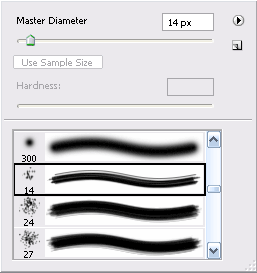
Tutorial: Pheonix Hair Style Tutorial: Pheonix Hair Style

Follow the hair's natural direction as shown in the illustration below (notice the wavy negru strokes). Once you've touched every strand, duplicate your layer and use a larger diameter brush to go over the hair again. Be careful not to touch the ears or skin.
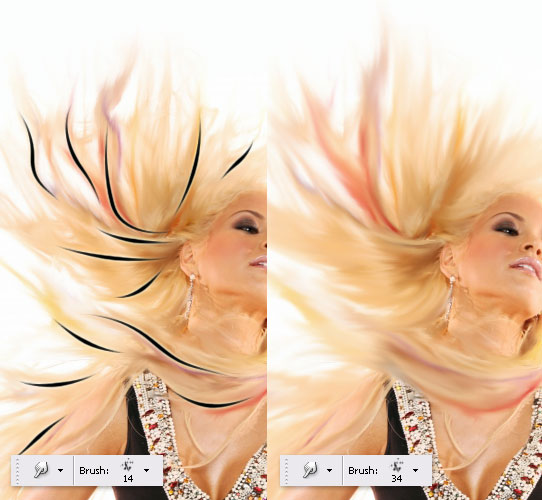
Tutorial: Pheonix Hair Style Tutorial: Pheonix Hair Style

When your satisfied with your wispy hair, use the Polygonal Lasso Tool to select the hair -- you don't need to be riguros here. Now Feather your selection by 15 pixels.
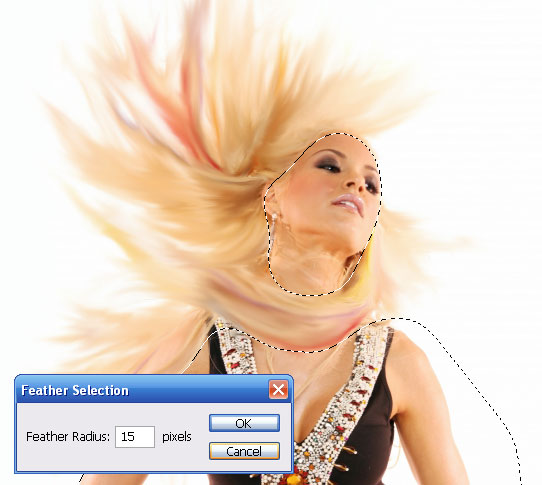
Tutorial: Pheonix Hair Style Tutorial: Pheonix Hair Style

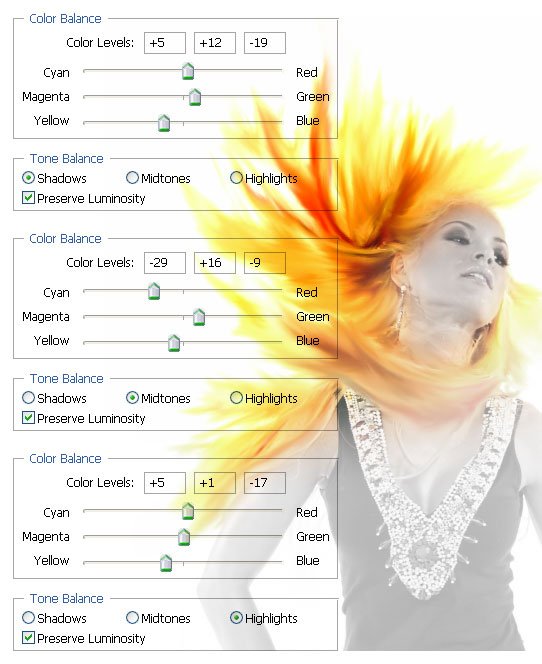
With your hair selected, bump up the brightness by +9, and the contrast by +41. These settings will vary depending on your image -- we're just trying to intensify the hair. Now comes the color correction. Make the hair glow by adding yellow shadows and highlights. Play with the settings until you've got your fire.
Tutorial: Pheonix Hair Style Tutorial: Pheonix Hair Style

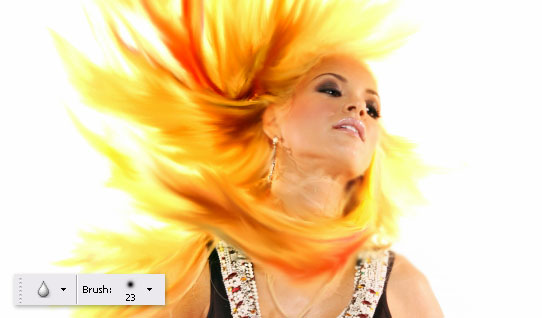
All of this fire will create heat, so take the Blur Tool and add some blurry spots to the edges of the face and neck.
Tutorial: Pheonix Hair Style Tutorial: Pheonix Hair Style

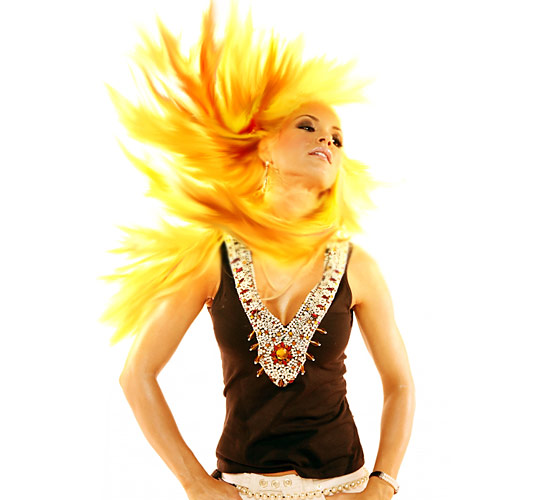
For some final enhancements, use the brush tool with a bright yellow and feather in a few hot spots on a new layer. Blur this layer and change the Blending Mode to Overlay.

That should do it. Add an overall yellow hue to your final image and put on your shades!
Tutorial: Pheonix Hair Style Tutorial: Pheonix Hair Style
_________________
<center>Tutorial: Pheonix Hair Style Tutorial: Pheonix Hair Style
Tutorial: Pheonix Hair Style Tutorial: Pheonix Hair Style
Tutorial: Pheonix Hair Style Tutorial: Pheonix Hair Style</center>
Back to top
View user's profile Send private message
Display posts from previous:   
Post new topic   Reply to topic    Bloodfist [SoD]'s Board Forum Index -> Tutoriale All times are GMT + 2 Hours
Page 1 of 1

 
Jump to:  
You cannot post new topics in this forum
You cannot reply to topics in this forum
You cannot edit your posts in this forum
You cannot delete your posts in this forum
You cannot vote in polls in this forum


Powered by phpBB © 2001, 2002 phpBB Group
Fa-ti si tu propriul forum GRATUIT, pe www.myforum.ro